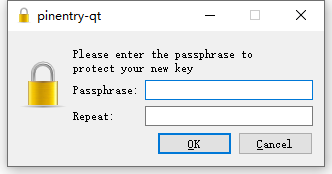
gpg (GnuPG) 2.4.7; Copyright (C) 2024 g10 Code GmbH This is free software: you are free to change and redistribute it. There is NO WARRANTY, to the extent permitted by law.
Please select what kind of key you want: (1) RSA and RSA (2) DSA and Elgamal (3) DSA (sign only) (4) RSA (sign only) (9) ECC (sign and encrypt) *default* (10) ECC (sign only) (14) Existing key from card Your selection? 1 # GPG 会询问生成何种加密类型的密钥,这里选择 1 RSA keys may be between 1024 and 4096 bits long. What keysize do you want? (3072) 4096 # 询问密钥位数,输入 4096 后按回车(GitHub 仅接受 4096 位及以上的位数,安全性更强) Requested keysize is 4096 bits Please specify how long the key should be valid. 0 = key does not expire <n> = key expires in n days <n>w = key expires in n weeks <n>m = key expires in n months <n>y = key expires in n years Key is valid for? (0) 0 # 询问密钥的过期时间,我们一般是不希望密钥过期的,直接按回车默认不过期即可 Key does not expire at all Is this correct? (y/N) y # 确认信息是否正确,直接Y回车 # 输入个人信息 GnuPG needs to construct a user ID to identify your key.
Real name: Ross # 昵称 Email address: bgs@onross.com # 邮箱,需要GitHub认证过的 Comment: Github Key #备注 You selected this USER-ID: "Ross (Github Key) <bgs@onross.com>"
Change (N)ame, (C)omment, (E)mail or (O)kay/(Q)uit? o # 按o 保存 We need to generate a lot of random bytes. It is a good idea to perform some other action (type on the keyboard, move the mouse, utilize the disks) during the prime generation; this gives the random number generator a better chance to gain enough entropy. We need to generate a lot of random bytes. It is a good idea to perform some other action (type on the keyboard, move the mouse, utilize the disks) during the prime generation; this gives the random number generator a better chance to gain enough entropy. gpg: revocation certificate stored as 'C:\\Users\\Administrator\\AppData\\Roaming\\gnupg\\openpgp-revocs.d\\F3199766E212A131E4437565F59509706A862E36.rev' public and secret key created and signed.
pub rsa4096 2025-03-26 [SC] F3199766E212A131E4437565F59509706A862E36 uid Ross (Github Key) <bgs@onross.com> sub rsa4096 2025-03-26 [E]