安装PortableGit
git-portable是针对windows版git所设计的一款软件。顾名思义,它就是便携版或移动版的git。你可以选择将它安装在U盘等便携设备上。它不需要安装,也不会在注册表上留下记录。正因为这样,你也无法像桌面版的git那样,使用右键“git Bash here”或者“git GUI here”。
下载PortableGit
下载地址:https://git-scm.com/downloads/win
解压文件
双击运行,不要手动解压
配置环境变量
%HOME% 为解压文件的路径,如:D:\dev_tools\PortableGit %path% 添加 %HOME%\CMD
配置用户信息
在解压路径新建文件.gitconfig
1 | |
查看信息
在命令行中输入git config --list,如果配置正确则输出下面的信息
1 | |
配置SSH
这里已经默认生成了密钥,将生成的密钥文件复制到%HOME%\.ssh目录下。 运行下面的命令,如果提示失败,大概率是windows目录下,文件的权限不正确,请配置权限为只读,删除所有权限,重新添加用户权限,设置为下图所示即可。
1 | |
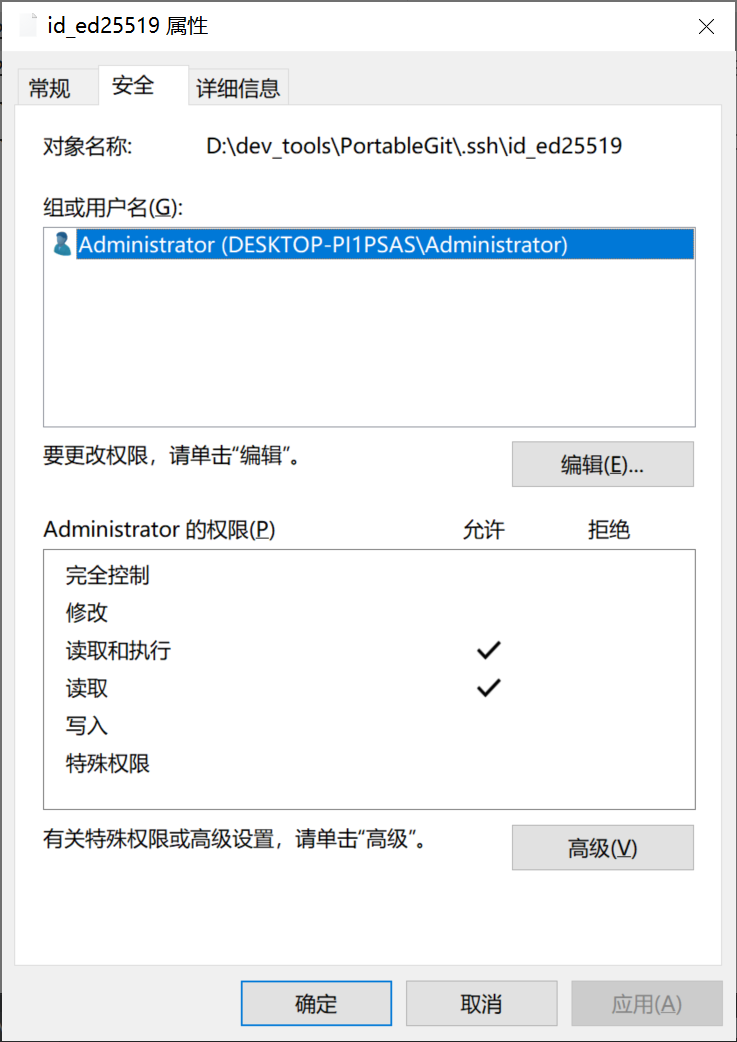
到此配置已经结束。另外我想说CSDN是一坨屎。
安装PortableGit
http://days.onross.com/cd881e13.html